First Encounter with a Small Demo Made in Unity
-
Setting up the spaceship and other scenes
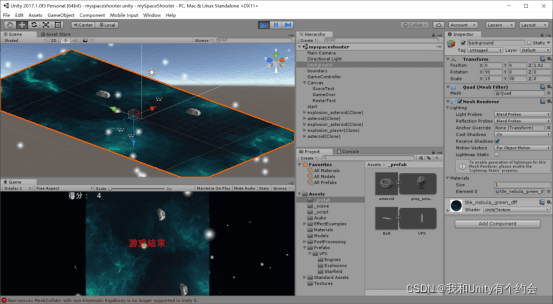
Scene layout: Place the lights in appropriate positions, pull the camera above the lights, create a new quad in the scene as the background, apply a material texture to it, drag the spaceship player into the scene, adjust its position, and add a fire effect at the tail of the spaceship. -
Writing a flight script for the spaceship
Player.cs:
 public float speed = 5.0f;

 float moveH = Input.GetAxis("Horizontal");
 float moveV = Input.GetAxis("Vertical");
 Vector3 move = new Vector3(moveH, 0, moveV);
 transform.Translate(speed * move * Time.deltaTime);
Drag the player.cs script onto the spaceship in Unity, making it a child object of the spaceship, so that the spaceship can be controlled using the up, down, left, and right keys on the keyboard.
- Creating bullet flight and prefab
Create a new game empty in the hierarchy named bolt, create a new quad as a child object of bolt, apply a material to it, adjust the bullet model's position below the spaceship, and also create a flight script bolt_move.cs for the bullet:
 public float speed = 5.0f;
 // Fly in the positive direction along the z-axis
 // Update is called once per frame
 void Update () {
     transform.Translate(Vector3.forward * speed * Time.deltaTime);
}
Similarly, drag the script onto the bullet.
Add a Rigidbody component and a capsule collider to the bullet:
Create a prefab for the bullet and place it in _prefab:
Just drag the bolt from the hierarchy into the _prefab in assets.
- Bullet firing
Create a bullet firing script and place it in the player:
// Time interval
public float fireRate = 0.5f;
// Fire a bullet every 0.5f
public float nextFire = 0.0f;

public GameObject shot;
public Transform shotSpawn;

// Click the mouse to fire a bullet
if (Input.GetButton("Fire1") && Time.time > nextFire)
{
    // A series of bullets with issues appeared, need to control the firing of bullets with time
    nextFire = Time.time + fireRate;

    // Instantiate (instantiate object 'position' angle)
    Instantiate(shot, shotSpawn.position, shotSpawn.rotation);
}
Click on the player and complete the settings in the inspector:
Run it, and the bullets will fire from below the spaceship.
- Bullet destruction and collision detection
Create a new cube named boundary, adjust its size and position to surround the spaceship.
Create a bullet destruction script destbyboundary.cs:
void OnTriggerExit(Collider other)
{
    Destroy(other.gameObject);
}
Drag it onto the boundary:
The relevant settings are as follows:
Run it, and the bullets will be destroyed when they fly out of the boundary.
- Adding asteroid movement and destruction
Create a new game object named Asterial, drag an asteroid model as a child object, adjust its position in the scene, and create a movement script as_move.cs for it:
 public float speed = 5.0f;

 void Update () {
     transform.Translate(Vector3.back * speed * Time.deltaTime);
}
Also add a Rigidbody component and a capsule collider to it.
At the same time, create a prefab for it, which will appear automatically later.
- Adding tag
Add the following code in the as_move.cs script:
// Asteroid rigidbody and collider trigger, boundary has a collider trigger, when trigger enter it will naturally respond.
void OnTriggerEnter(Collider other)
{
    //print(other.name);// The corresponding name is boundary, destruction is boundary, so it needs to be modified
    // Instantiate particle object
    if (other.tag == "Boundary")
        return;

    gameController.GameOver();

    Destroy(other.gameObject);
}
Make property response modifications here.
- Asteroid and spaceship explosion
Add the following code in as_move.cs:
 public GameObject explosion;
 public GameObject playerExplosion;

// Instantiate the asteroid explosion particle effect, generate particle effect at the asteroid's position
Instantiate(explosion, transform.position, transform.rotation);
// Instantiate the player's explosion effect, generate particle effect at the spaceship's position
if (other.tag == "Player")
{
    Instantiate(playerExplosion, other.transform.position, other.transform.rotation);
}
Destroy(other.gameObject);

// When the asteroid is hit, the player's score increases, and this process needs to be notified to the Text control for display
gameController.AddScore(scoreValue);

Destroy(gameObject);
}
As shown in the figure,
After running, the shooting asteroid and explosion effect after collision will appear.
- Batch generation of asteroids:
Here we need to use a coroutine method:
IEnumerator WaitAndPrint()
{
    yield return new WaitForSeconds(5);
    print("WaitAndPrint" + Time.time);
}
Create a new game object named gamecontroller, create a script gamecontroller.cs:
// Instantiate asteroid objects, position
public GameObject hazard; // Represents the asteroid object
public Vector3 spawnValues; // Represents the change values of the x-axis and z-axis for generation
private Vector3 spawnPosition = Vector3.zero; // Represents the generation position
private Quaternion spawnRotation;

public int hazardCount = 6;

// Delay generation time
public float spawnWait;

// Do not want the game to immediately generate asteroids at the beginning, but wait for a while, add a variable to control the waiting time
public float startWait = 1.0f;

// Code to generate asteroids
IEnumerator SpawnWaves()
{
    yield return new WaitForSeconds(startWait);
    while (true)
    {
        for (int i = 0; i < hazardCount; i++)
        {
            spawnPosition.x = Random.Range(-spawnValues.x, spawnValues.x);
            spawnPosition.z = spawnValues.z;
            spawnRotation = Quaternion.identity;
            Instantiate(hazard, spawnPosition, spawnRotation);
            yield return new WaitForSeconds(spawnWait);
        }
        yield return new WaitForSeconds(2.0f);
    }
}

void Start () {
    StartCoroutine(SpawnWaves());
}
Set the required parameters according to the scene.
Run it, and the asteroids can be generated randomly.
- Create a data transfer between different scripts, create a game lifecycle: record scores, game over, and restart.
Add the following code in as_move.cs:
private GameController gameController;
public int scoreValue; // Increased score

gameController.GameOver();

void Start()
{
    // Bind the gamecontroller defined here with the previous gamecontroller, generally speaking
    // So we first find the object with findwithtag, and then find the gamecontroller script with getcomponent
    GameObject go = GameObject.FindWithTag("GameController"); // Note, must make modifications in property response

    if (go != null)
        gameController = go.GetComponent<GameController>();
    else
        Debug.Log("Cannot find the object with tag GameController");
    if (gameController == null)
        Debug.Log("Cannot find the script GameController.cs");
}
Add the following code in gamecontroller.cs:
public Text ScoreText;
private int score;

public Text gameOverText;
private bool gameOver;

public Text restartText;
private bool restart;

if (gameOver)
{
    restartText.text = "Press [R] to restart";
    restart = true;
    break;
}

// Use this for initialization
void Start () {
    score = 0;
    ScoreText.text = "Score:   " + score;
    gameOverText.text = "";
    gameOver = false;

    restartText.text = "";
    restart = false;
    StartCoroutine(SpawnWaves());
}

// Modify score
public void AddScore(int newScoreValue)
{
    score += newScoreValue;
    ScoreText.text = "Score:   " + score;
}

// Modify end properties
public void GameOver()
{
    gameOver = true;
    gameOverText.text = "Game Over";
}

void Update()
{
    if (restart)
    {
        if (Input.GetKeyDown(KeyCode.R))
            Application.LoadLevel(Application.loadedLevel);
    }
}
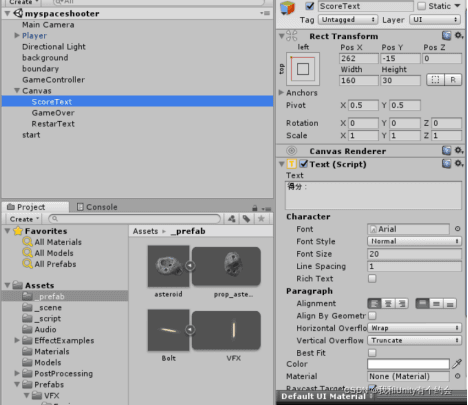
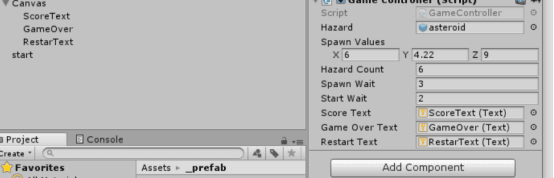
Set up as follows in the scene:
Thus, a small space spaceship game is basically completed.
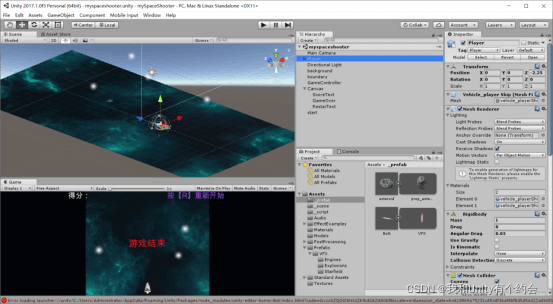
Run the game: